AI
How to Get AI Actually Working for Your Business
You're paying for AI tools. You've watched the demos. You've tried a few prompts. And somehow, Friday afternoon still looks exactly like it did six months ago — every proposal written by hand, every follow-up email typed from scratch, every onboarding message copied and pasted one more time.
The problem almost certainly isn't the tool. It's that the workflow was already broken before AI arrived. Pouring AI into a confused process doesn't clear the confusion — it just speeds it up. As one way to think about it: if there's a brick wall ahead, you're just going to hit it at a more impressive speed.
This article walks through how to find the one task worth automating in your business, make it ready to automate, and build something that keeps running after launch.
Start with the work, not the tool
The most common mistake is buying the tool first and figuring out what to do with it later. A useful test before purchasing anything: can you name the specific repeated task this will handle? Not "communication" or "admin" — but a concrete, repeatable sequence. "Every Monday I manually compile last week's leads from three sources into one spreadsheet" is a task. "Save me time" is not.
If the answer is vague, you don't have a tool decision yet. You have a workflow question.
Find your quiet time leak
Most businesses have one or two tasks that look small individually but add up to several hours a week. These are good candidates for automation — not because they're the most dramatic, but because they happen enough times that a reliable system pays off quickly.
A simple exercise: pick any repeated task and write down five things about it. How many times did it happen last week? Who touched it? Where did the information come from? What did the client or colleague actually receive at the end? Where did it slow down or disappear?
That five-minute exercise often reveals more than a month of vague frustration. Tasks that seem obvious to automate often turn out to have a hidden human judgment step in the middle. Tasks that seem too small often turn out to happen fifteen times a week.
Choose the right first workflow
The loudest pain in your business is rarely the right place to start. Loud problems are often complex, involve multiple people, or depend on information that isn't consistent enough to automate cleanly.
A better first workflow has most of these characteristics:
- It happens more than three times a week
- The inputs are reasonably consistent — the same kind of information every time
- There's a clear, describable output
- If it produces a wrong result, you can catch it before it reaches a client
- You can describe the steps in plain language without needing to "just know"
That last point matters more than it sounds. If you can't describe the steps clearly enough to explain them to a new employee, an AI system will have the same problem. The constraint isn't the AI — it's the undocumented judgment that lives only in your head.
Clean the workflow before you automate it
Automation reveals existing problems rather than hiding them. The four most common issues to fix before you build anything:
- Duplicate records. The same contact appears in two systems with different spellings. Any automation that touches both will create two outputs, or the wrong one.
- Unclear ownership. Nobody knows who's supposed to act when the workflow produces a result. The task ends up sitting in a queue with no one monitoring it.
- Chaotic file names. If files are named "final-v3-FINAL-revised," an automated system that moves or links files will quickly create a mess faster than a human could.
- Notes buried in email threads. Information that lives only in an email chain can't be pulled reliably by an automated step. It needs to be in a system that can be read consistently.
You don't need everything to be perfect. You need it to be consistent enough that a described process would produce the right result most of the time.
Build in a human review step
"Skipping the review phase saves time in the same way that skipping brakes improves cycling speed. Very briefly."
The safest automation designs have a clear moment where a human checks the output before it reaches anyone outside the business. Not every output — that would defeat the purpose. But there should be a point in the workflow where you've looked at a sample recently enough to catch if something has quietly gone wrong.
A simple question before building any workflow: if this produces a wrong output tomorrow morning, would you know before a client does? If the answer is "probably not," the review step needs to be built in earlier.
Three types of workflows that work well as a first project
Most small businesses find early success in one of three areas:
Front-door management. Acknowledging new leads, routing enquiries to the right person, and following up on leads that haven't received a response. This is usually the easiest to start with because the inputs are predictable (a form submission or email arrives) and the output is low-stakes (an acknowledgment message, not a contract).
Client communication drafts. Generating first drafts of proposal emails, appointment reminders, or status updates using the client's name, project category, and relevant details. A human reviews and sends — the AI handles the mechanical part of constructing a consistent, on-tone draft.
Back-office routing. Moving completed documents to the right folder, flagging overdue invoices for follow-up, or compiling a weekly summary from multiple sources. These rarely touch clients directly, which makes them safer to automate early.
After launch: keep it running
Automations fail in predictable ways over time: the tool changes its interface, a key staff member leaves and nobody updates the workflow owner, or the business itself changes but the automation doesn't. A 15-minute monthly check covers most of this: pick one live workflow, check that it has an owner, verify it ran recently, and open one real output to read it as a client would.
Keeping a short log of what changed and why — even four columns in a spreadsheet — means you don't have to reconstruct decisions from memory six months later when something breaks.
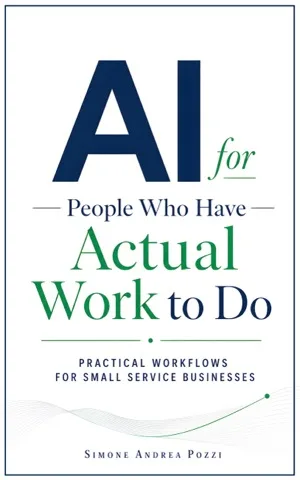
Want the full guide?
AI for People Who Have Actual Work to Do
Choose the one repeated task in your business that truly deserves a system, then build an AI workflow you can actually trust.
Available on Amazon Kindle
Related reading